概述
2026 年 6 月,homelab 四 worker 集群里 k8s-50 在 Grafana 上 CPU 长期偏高(一度接近 80%),而同节点的 Descheduler 每 15 分钟跑一轮却从不驱逐 Pod。排查、加看板、补配置、放宽调度约束之后,Nexus 从 k8s-50 迁到了 k8s-71,节点负载肉眼可见地降了下来。
本文按时间线记录全过程;概念细节见 Descheduler 与 Resource Requests。
时间线
| 阶段 | 时间 | 做了什么 |
|---|---|---|
| 部署 Descheduler | 2026-06-18 | ArgoCD 安装 LowNodeUtilization,CronJob 每 15 分钟 |
| 发现异常 | 2026-06-23 | Node Exporter Full(1860)见 k8s-50 CPU ~80%,Descheduler 日志 evictedPods=0 |
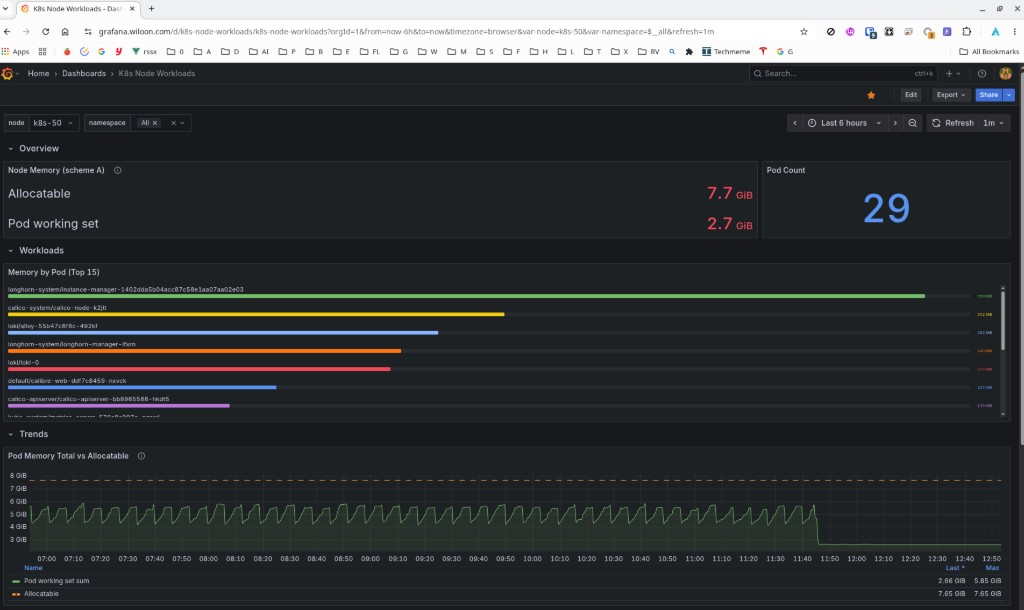
| 加监控 | 2026-06-23 | 新建 Grafana 看板 K8s Node Workloads(k8s-node-workloads) |
| 根因 | 2026-06-23 | Grafana 看实际用量,Descheduler 看 requests;大量 Pod 未声明 requests |
| 治理 | 2026-06-23 | 补 requests、放宽 Nexus affinity、Kong/Tekton 进 Git、Descheduler 开 nodeFit |
| 见效 | 2026-06-23 | Nexus Pod 落到 k8s-71,Longhorn 卷 attach 成功,k8s-50 压力缓解 |
1. 发现问题
1.1 现象
在 Grafana Node Exporter Full(社区看板 1860)上选 k8s-50(192.168.50.50:9100):
- CPU Busy 约 83%,Pressure → CPU 约 78%
- 曲线从凌晨 02:00 起平台期,不是瞬时尖峰
- Sys Load 很高(相对核数有大量可运行进程在排队)
- 内存约 63%,相对 CPU 没那么极端
1860 只能看节点级指标,看不出是哪些 Pod 在抢 CPU。
1.2 Descheduler「装了但没动」
集群里已有 Descheduler(infra/homelab/k8s/descheduler/values.yaml,ArgoCD Application descheduler):
- CronJob
*/15 * * * *,Job 均Complete - 每轮日志:
Number of overutilized nodes: 0、All nodes are under target utilization, nothing to do here、evictedPods=0
当时直觉是「自动均衡坏了」;实际是策略判定没有任何节点 overutilized。
1.3 人工对照
kubectl top nodes
kubectl get pods -A --field-selector spec.nodeName=k8s-50 --no-headers | wc -l
kubectl describe node k8s-50   # Allocated resources
k8s-50 上 Pod 数量多(约 34),但 describe node 里 CPU requests 合计只有约 42%——和 Grafana 上的 80% 实际 CPU 对不上。
2. 加监控:K8s Node Workloads 看板
2.1 为什么 1860 不够
| 看板 | 能回答 | 不能回答 |
|---|---|---|
| Node Exporter Full (1860) | 节点总 CPU/内存/磁盘 | 该节点跑了哪些 Pod、各占多少 |
| k8s-node-readiness | 节点 Ready 抖动 | 工作负载清单 |
| Helm 自带 Node (Pods) | Pod 资源趋势 | owner、OOM、exit code 一张表 |
2026-06-23 同时还在查 k8s-50 内存波动:kubectl top 见 Nexus OOM exit 137、ArgoCD controller ~688Mi 等,需要「选节点 → 一张表看清 Pod / 工作负载 / 内存 / 重启」。
2.2 交付物
- JSON:
infra/homelab/k8s/observability/grafana/dashboards/k8s-node-workloads.json - UID:
k8s-node-workloads - 变量:
node(单选)、namespace(多选) - v1 以内存为主:Pod 表格含 owner、working set、request/limit、restart、last exit code(137 标 OOM)
- 推送:
task grafana:push(Spec 见 w10n-configTASK-SPEC-k8s-node-workloads-dashboard.md)
看板把「k8s-50 上谁最占资源、谁在 OOM」从多次 kubectl top + get pods 收成一次筛选,为后面决定迁谁、补谁 requests 提供了依据。
3. 根因:两套「利用率」
3.1 Descheduler 日志里的 k8s-50
某轮 LowNodeUtilization 输出(节选):
Node is appropriately utilized  node=k8s-50  usagePercentage={"cpu":42,"memory":33,"pods":31}
Number of overutilized nodes: 0
Grafana:实际 CPU ~80%。Descheduler:requests 占比 42%,低于 targetThresholds 的 60%,故不算 overutilized。
3.2 原因归纳
- 度量口径不同:node_exporter /
kubectl top= 实际用量;LowNodeUtilization= 各 Podresources.requests之和 ÷ allocatable(见 Resource Requests)。 - 大量 Pod 无 requests:Argo CD、Kong、Tekton 等在调度账本里接近 0,却可以占满 CPU。
- 部分 requests 偏低:Nexus 声明 500m CPU,实测常 500m+,仍不足以单独把节点推过 60% 阈值。
因此:不是 Descheduler 坏了,而是它按 requests 账本认为「还不忙」。
3.3 其它误判点
- PVC 默认保护:Descheduler v0.36 里
PodsWithPVC在extraEnabled,未启用时不保护;真正挡住迁移的是 nodeAffinity、DaemonSet、PDB 等(见 Descheduler 文 §DefaultEvictor)。 - Nexus「两个副本」:Deployment
replicas: 1(只跑 1 个 Pod);Longhorn VolumenumberOfReplicas: 2(数据在 k8s-50 与 k8s-71 各一份 replica)。说的是两件不同的事。
4. 解决问题
4.1 补 resources.requests
按 kubectl top 给常驻 workload 补 requests,让调度器与 Descheduler 账本接近真实负载(w10n-config):
| 组件 | 改动位置 | requests(示例) |
|---|---|---|
| Argo CD | argocd/resource-requests-patch.yaml 等 |
controller 200m/768Mi,repo-server 50m/256Mi … |
| Kong | kong/values.yaml + ArgoCD application-kong |
proxy 100m/384Mi,ingress-controller 50m/128Mi |
| Tekton | tekton/platform/ + application-tekton-platform |
controller/webhook 等 50m/64–128Mi |
| Prometheus/Grafana/Loki | 此前已在 kube-prometheus-stack/values.yaml 等 |
已有 |
Argo CD 自身若 kubectl apply -k argocd/ 会因 commonLabels 与 immutable selector 冲突,可对 Deployment/StatefulSet 单独 patch template 里的 resources。
4.2 Descheduler 微调
descheduler/values.yaml:
nodeFit: true— 驱逐前调度器 dry-run,避免迁到放不下的节点- 修正
podProtections注释(v0.36 PVC 保护需extraEnabled,非默认)
策略仍为 LowNodeUtilization:thresholds 25% / targetThresholds 60%,CronJob 每 15 分钟。
4.3 Nexus:放宽 affinity + 验证 Longhorn
Deployment 原先用 required nodeAffinity 限定 k8s-50 / k8s-71;改为 preferred(weight 100,仍优先这两台),便于调度器在 Descheduler 驱逐后重排。
Longhorn(卷 pvc-73c87932-...):
numberOfReplicas: 2,replica 分别在 k8s-50、k8s-71- 变更前 attach 在 k8s-50;apply 后 Pod 重建到 k8s-71,卷
state=attached、node=k8s-71 - 集群内无
numberOfReplicas: 1的现网卷(SC 名longhorn-single是历史命名,Volume CR 上已是 2 副本)
Nexus 使用 strategy: Recreate + RWO PVC,迁移会短暂不可用(readiness 初始延迟 180s),属预期。
4.4 效果
- Nexus 从 k8s-50 → k8s-71,Longhorn attach 正常
- k8s-50 上 CPU requests 合计约从 1660m 降到 1160m(Nexus 500m 迁走)
- Grafana 上 k8s-50 实际 CPU 趋势回落;Descheduler 后续轮次在 requests 补全后更容易识别 overutilized 节点
5. 排查命令备忘
# Descheduler 本轮结论
kubectl logs -n kube-system -l app.kubernetes.io/name=descheduler --tail=30 \
  | grep -E 'usagePercentage|overutilized|evicted'

# 节点:实际 vs 账本
kubectl top node k8s-50
kubectl describe node k8s-50 | awk '/Allocated resources:/,/Events:/'

# 某节点 Pod 与 requests
kubectl get pods -A --field-selector spec.nodeName=k8s-50 \
  -o custom-columns='NS:.metadata.namespace,NAME:.metadata.name,CPU:.spec.containers[0].resources.requests.cpu'

# Longhorn 卷与 replica
kubectl get volumes.longhorn.io -n longhorn-system <volume-name> -o yaml
kubectl get replicas.longhorn.io -n longhorn-system -l longhornvolume=<volume-name>
Grafana:1860 看节点总负载;k8s-node-workloads 看该节点 Pod 清单与内存/OOM。
6. 经验小结
- 先对齐度量:监控上的「忙」≠ Descheduler 眼里的「忙」;装 Descheduler 前或同时应补 requests。
- 看板分层:节点级(1860)+ 工作负载级(k8s-node-workloads)+ 调度账本(
describe node)+ Descheduler 日志,四者对照才快。 - 有 PVC 的服务:分清 Deployment replicas 与 Longhorn volume replicas;多副本卷 + 放宽 affinity 后,RWO Pod 可以跨节点重建 attach,但要接受 Recreate 停机窗口。
- Descheduler 是辅助:节点维护仍用
drain;日常重平衡依赖 requests 准确、阈值保守、观察 CronJob 日志。